Kakobuy Cable Management Box Spreadsheet Guide
Kakobuy Cable Management Box Spreadsheet Guide
Kakobuy Cable Management Box Spreadsheet Guide: Filter by Power Strip Size, Cable Exit Direction, and Heat Dissipation Space
Whether a desktop cable management box fits cannot be judged by appearance alone. What really determines usability are power strip dimensions, adapter space occupancy, cable bend radius, opening direction, and heat dissipation conditions. This guide helps you eliminate candidates from the Kakobuy Spreadsheet that have incompatible sizes or unreasonable structures, and establish a checklist to review item by item before placing an order.
This article is suitable for users storing ordinary power strips, chargers, and low-power desktop devices. It is not suitable for industrial equipment requiring professional fire ratings, waterproof capability, or forced ventilation, nor is it recommended to use a closed cable management box to cover power supplies, transformers, or network devices that generate significant heat.
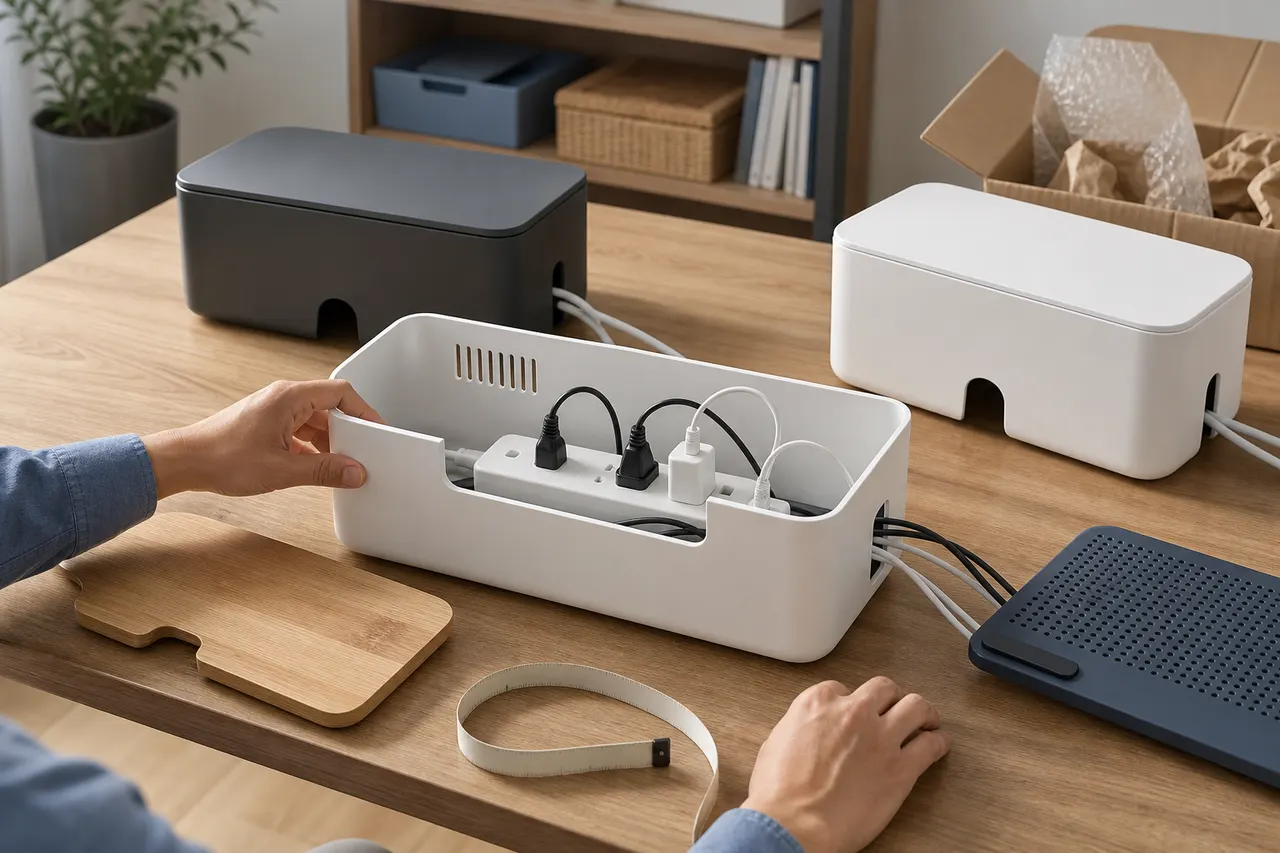
First Confirm the Power Strips, Adapters, and Cables to Be Stored
Do not choose a cable management box first and then try to stuff all devices into it. First, lay out the planned items on the desk, including the power strip, all permanent plugs, chargers, transformers, USB hubs, and cables that need to pass through openings.
Record the following information:
Length, width, and height of the power strip body
Total height after plugs are fully inserted
Width of the largest adapter, and whether it will block adjacent outlets
Direction in which the power cord extends from the end or side of the power strip
Number of cables that need to exit from the left, right, rear, or top of the cable management box
Whether it is necessary to operate the power strip switch without opening the cover
📏 Measurements should be based on actual usage conditions. Packaged dimensions, bare power strip dimensions, and occupied dimensions after adapters are fully inserted are not the same values.
If the power strip has a vertically protruding switch, timer, or surge protector module, measure the highest point separately. When planning to store multiple large adapters, arrange them according to the actual outlet positions, because adapters may not fit tightly side by side.
What Candidate Information Can the Kakobuy Spreadsheet Provide
Kakobuyspreadsheetqc.com can serve as an entry point for discovering and organizing candidate products, but the names, categories, or images in the spreadsheet cannot replace product pages and warehouse QC images. Cable management boxes are particularly prone to having similar names, different sizes, or multiple specifications under the same link.
When filtering, prioritize these verifiable fields:
Product name and specification options
External and internal dimensions
Material description
Number of side or end openings
Whether the top cover is removable
Whether there is a top cable routing slot
Net weight or package weight
Original product page status
QC images after warehousing
If a candidate record only has a display image without dimensions, specifications, or accessible product information, mark it as "insufficient information" instead of guessing based on image proportions. Product prices, inventory, specifications, domestic shipping fees, and link status may change, so they need to be rechecked on the day of order submission.
The platform information in this article was recorded on August 27, 2026. Final available specifications, fees, and service conditions should be based on the checkout page, route quotes, and customer service confirmation.
Measure Power Strip Dimensions and Allow for Plug Bend Space
The external dimensions marked on the cable management box cannot be directly used to judge capacity. Wall thickness, internal ribs, opening frames, and cover latches all reduce internal space. When only external dimensions are available, request the seller to provide internal usable dimensions, or keep that candidate in the pending confirmation area.
It is recommended to calculate the minimum requirements in the following order:
Internal length should at least accommodate the power strip body, power cord connector, and end bending space.
Internal width should at least accommodate the widest adapter, and avoid the adapter touching both side walls.
Internal height should be measured from the bottom of the power strip to the top of the highest plug or adapter.
Leave extra clearance under the cover to prevent the cover from pressing on plugs, switches, or cable sheaths.
Cables should turn naturally when passing through openings, without being forced into sharp angles by the hole edges.
Do not use a fixed "safety margin" to replace actual placement. Soft USB cables and thick power cords require different bend spaces, and straight-in chargers and side-exit adapters have different heights. The most reliable method is to draw the internal boundaries of the cable management box on paper, and then place device outlines according to measured dimensions.
Filter by Opening Position, Top Cover Structure, and Desk Layout
More openings do not necessarily mean more practical. The key is whether the openings are located where cables actually pass.
When the desk is against a wall, rear cable exit is usually easier to hide, but you must confirm there is still cable turning space between the wall and the box. When the cable management box is placed on the left or right side of the desk, the end opening should face the power source of the power strip; if the direction is opposite, the main power cord may have to wrap around the box, making it messier.
The top cover structure should be checked for three main points:
Whether the cover can close properly after devices are inserted
Whether the top cable routing slot will pinch charging cables
Whether daily plugging and unplugging requires moving the entire cable management box
🔌 If charging cables are used frequently, a structure with an independent top cable routing slot is usually more convenient than squeezing all cables into side holes. If the power strip switch needs to be operated often, prioritize models that can be opened with one hand or have an operation opening.
Under-desk hanging, desktop placement, and floor placement are different scenarios. When the product has no explicit mounting holes, brackets, or load-bearing instructions, do not assume it is suitable for hanging installation on your own.
Use a Comparison Table to Record Sizes, Cable Exit Directions, and Visible Structures
Putting candidate products into the same table can prevent confusion between similar links. Unknown information should be written as "to be confirmed", not filled in with estimates.
Check Item | Candidate A | Candidate B | Your Minimum Requirement |
|---|---|---|---|
Internal length, width, height | To be confirmed | To be confirmed | Fill in based on measured devices |
Main power cord exit direction | To be confirmed | To be confirmed | Left, right, or rear |
Other cable outlets | To be confirmed | To be confirmed | Fill in quantity and position |
Top cover structure | To be confirmed | To be confirmed | Removable, flip, or latch |
Heat dissipation openings | To be confirmed | To be confirmed | Position must not be blocked |
Switch operability | To be confirmed | To be confirmed | Whether frequent operation is needed |
Material and wall thickness | To be confirmed | To be confirmed | Do not infer from images |
Product and package weight | To be confirmed | To be confirmed | For shipping cost estimation |
QC verifiable items | To be confirmed | To be confirmed | Openings, edges, cover, bottom |
When comparing, first eliminate candidates with insufficient internal dimensions and conflicting cable exit directions, then compare appearance, color, and price. This avoids paying product cost and international shipping for a model that cannot route cables properly.
QC Image Verification: Openings, Edges, Cover, and Bottom
After the product arrives at the Kakobuy warehouse, inspection usually focuses on style, quantity, color, size, model, and appearance information. For cable management boxes, use the QC images provided by the warehouse to confirm visible structures, but do not equate appearance inspection with electrical safety testing or long-term heat resistance testing.
When viewing QC images, check in order:
Whether the number and position of openings match the selected specification
Whether there is obvious burring, cracking, or deformation at the opening edges
Whether the cover is intact, and whether the latches and hinges show visible abnormalities
Whether the box edges are warped, and whether the cover closing line is significantly misaligned
Whether the bottom is flat and anti-slip pads are complete
Whether the color and size labels match the order options
Whether the packaging includes accessories explicitly listed on the product page
🔍 If existing photos do not show internal dimensions, ask as soon as possible within the return/exchange processing period whether additional photos with a ruler can be provided. Measurement requests should specify the starting point, ending point, and unit, for example, "Please measure the usable width between the left and right internal walls of the box." This is more likely to yield a decisive result than just writing "please measure dimensions."
Photos may have perspective errors, so internal dimensions cannot be accurately calculated by pixel ratio. Sealed packaging or non-apparel items with tamper-evident labels may not be opened for inspection. In that case, judge based on outer packaging information, and list unconfirmable internal structures as residual risk.
Boundaries of Heat Dissipation, Load-Bearing, Logistics, and Return/Exchange Information
The main purpose of a cable management box is to organize cables, not to provide cooling for high-heat devices. Before use, check the ventilation requirements of the power strip and adapter manufacturers. If a device generates noticeable heat during operation, requires active cooling, or is explicitly prohibited from being covered, it should not be placed in a closed box.
Heat dissipation assessment should focus on:
Whether openings will be blocked by walls, desk boards, or other objects
Whether multiple adapters are tightly packed together
Whether excess cables accumulate inside and cover adapters
Whether there is still an airflow path after the cover is closed
Whether the material has only a generic description without heat resistance or flame retardant rating proof
When there is no test report, do not infer flame retardant ability from descriptions like "thickened", "safe material", or appearance texture. Warehouse QC photos also cannot prove long-term heat dissipation performance.
Regarding logistics, a cable management box may not be heavy but can be bulky. International shipping costs are usually affected by package dimensions, chargeable weight, destination country, and selected route. Combining packages may reduce repetitive packaging, but may also increase volumetric weight or subject fragile items to more compression. Before submitting a package, compare available routes using actual or estimated packed data, rather than judging total cost solely by product price.
Platform information indicates that Kakobuy's total cost may include product cost, mainland China shipping, international shipping, and applicable customs fees. Related amounts, exchange rates, coupons, and logistics routes are subject to change and need to be re-verified at the time of payment and international parcel submission.
Platform information also shows that after ordinary items are warehoused, there is a return/exchange processing window calculated from 120 hours, with exceptions for customized items, restricted items, and items where removal of packaging or accessories has been requested. This condition may be adjusted, and whether the seller accepts returns, domestic return shipping costs, and product condition will also affect the outcome. Therefore, immediately check the actual available operations in the order after discovering any issues.
Build a Candidate List and Complete Pre-order Review
The final list should ideally keep only two to three candidates with relatively complete information. Each candidate should save specific specifications, not just the product name, because different sizes on the same page may share the same main image.
Complete the following review before ordering:
Product link is still accessible, and required specification is still selectable
Internal usable dimensions can accommodate the power strip and inserted adapters
Main power cord and common charging cables have suitable exits
Cover will not press on plugs, switches, or cables
Opening positions match the desk, wall, and power direction
Product page does not mistake external dimensions for internal dimensions
Unclear material or safety rating has been marked as a risk
Domestic shipping, international chargeable weight, and route restrictions have been rechecked
QC items to verify after warehousing have been written in advance
Return/exchange processing deadline and non-applicable situations have been confirmed
✅ The main saving of this filtering method is not the unit price of the cable management box, but reducing domestic return fees, international shipping costs, and reordering time caused by buying the wrong size. The added cost is measuring, recording, and waiting for supplementary information.
This method is suitable for users willing to measure devices before ordering and view QC images after warehousing. If the device generates significant heat, requires certification ratings, is intended for hanging installation, or the product page cannot provide key dimensions, it is not recommended to complete the purchase solely based on Spreadsheet candidates. In such cases, choose products with more complete information, or switch to solutions that better fit actual conditions, such as open cable management racks.
Agent Platform Shopping FAQ
1. How do I view quality inspection photos on kakobuy?
When viewing QC photos, pay attention to the specific features of the purchased item. For shoes, check key areas such as the toe box, heel, and tongue, observing stitching, shape structure, and tongue thickness to determine if it is a quality product. For clothing, examine details like collar labels, logo embroidery, fabric, and the neatness of collars and cuffs.
2. How can kakobuy users judge product quality?
When evaluating product quality, refer to QC photos—do not rely solely on factory-provided photos, as these are often retouched. Use QC photos to confirm whether the product meets your specific requirements for details before deciding to purchase.
Also, avoid buying extremely low-priced items, as they are often of poor quality.
3. Why doesn't kakobuy use Google Sheets?
Google Sheets is only suitable for spreadsheets with a small number of products. Once the number of products increases, loading becomes very slow and the system lags noticeably. Especially on mobile devices, the visual experience is poor and searching for products is extremely inconvenient. For the same set of products, the kakobuy website's spreadsheet loads faster and offers a better visual experience.
4. What should first-time kakobuy agent platform users pay attention to?
First-time users accessing the kakobuy Taobao agent through the spreadsheet usually receive a new user shipping discount package. You should also check the step-by-step shopping tutorial for beginners.
5. What types of products can be found in kakobuy's spreadsheet?
The kakobuy website's spreadsheet covers shoes, clothing, bags, accessories, jerseys, perfumes, hats, scarves, belts, and various household items.
Browse our latest products and find your next favorite item.